
Do iPhones Have SIM Cards or eSIM? Everything You Need to Know
Recent US iPhones do not have physical SIM cards. Since the iPhone 14, all US models have been eSIM-only, while older iPhones still support nano-SIM. The exact setup depends on the model generation and the country where the phone was purchased.
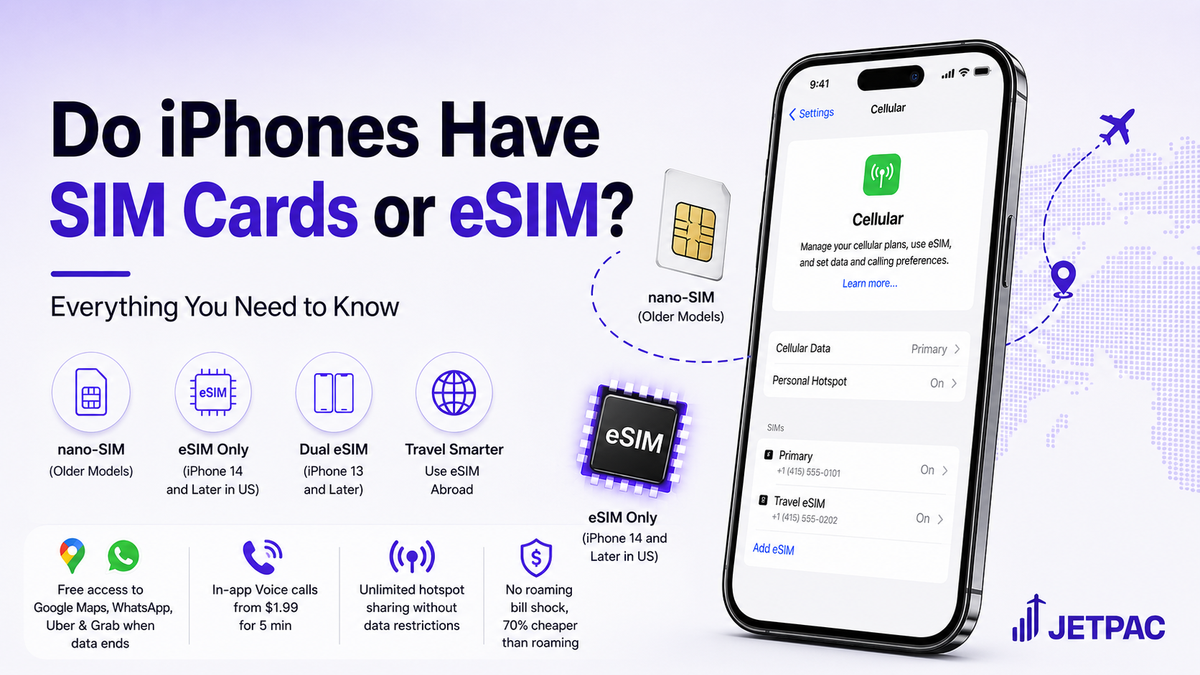
If you bought your iPhone in the US in the last few years, there is a good chance your phone has no SIM card slot. Apple removed the physical SIM tray from all US iPhone models starting with the iPhone 14 in 2022, and every US iPhone since then works the same way: eSIM only. No card, no tray, no slot.
Do iPhones have SIM cards? It depends on the generation and where it was purchased. US buyers of the iPhone 14 and later have no physical SIM at all. iPhone 13 and older still do. And the iPhone Air, released in 2025, has no SIM tray anywhere in the world.
This blog covers every generation from the iPhone 11 to the 17, what eSIM means day to day, what US carriers charge, and how to handle data when you travel internationally.
What SIM Card Does an iPhone Use?
SIM
The Standard Format
iPhones that have a physical SIM slot use a nano-SIM. This has been the standard since the iPhone 5 in 2012. The nano-SIM is the smallest physical card format at 12.3 by 8.8 millimetres.
If your carrier ever sent you a punch-out card with multiple sizes, the nano-SIM was the smallest section.
Compatibility
The Evolution to eSIM
Any iPhone with SIM card support uses this nano format, and from the iPhone XS and XR onwards in 2018, every model also has an eSIM chip built directly into the phone's logic board. On older models, this sits alongside the nano-SIM tray.
On US models from the iPhone 14 onwards, the eSIM chip replaced the tray entirely. Either way, both types do the same job: connect you to a mobile network and give you a phone number, data, and calls.
Which iPhone Has Which SIM: Generation by Generation
Setup
iPhone 11 and iPhone 12
Both generations came with a nano-SIM tray plus eSIM on all US models. iPhone 11 SIM card and iPhone 12 SIM card setups are the same: one physical nano-SIM and one eSIM can be active at the same time, with up to eight eSIM profiles stored on the device.
These are the last two generations where US buyers had a straightforward physical SIM card option on every model.
eSIM
iPhone 13 Generation
Does iPhone 13 have a SIM card? Yes. US models of the iPhone 13 kept the physical nano-SIM tray. What changed was eSIM capability: the iPhone 13 was the first generation to support two active eSIM profiles simultaneously.
This meant you could run two numbers on one iPhone without needing a physical card in the tray for either of them. The tray was still there on the iPhone 13 if you wanted it. It disappeared from US models the following year.
Shift
iPhone 14 Generation
Does iPhone 14 have a SIM card? If you bought it in the US, no. Apple removed the physical SIM tray from every iPhone 14 sold in America. All four models are eSIM-only, and two eSIM profiles can be active simultaneously.
This is the configuration that has continued on every US iPhone since. International models of the same iPhone 14 kept the nano-SIM tray, which is why an internationally purchased iPhone 14 may have a SIM slot, and a US one does not.
Standard
iPhone 15 and iPhone 16
Does the iPhone 15 have a SIM card? Does the iPhone 16 have a SIM card? For US buyers, no on both. eSIM-only across every model in both generations, including the budget iPhone 16e.
iPhone 16 eSIM support covers all five models in the lineup, each capable of storing eight or more profiles and running two active lines simultaneously. International models kept the nano-SIM tray on both generations. US models did not.
eSIM
iPhone 17, iPhone Air, and iPhone 17e
Released in September 2025, the iPhone 17, 17 Pro, and 17 Pro Max continued to support eSIM-only for US buyers. The iPhone Air went further: it is eSIM-only worldwide, with no physical SIM slot in any market.
The iPhone 17e, released in 2026, is also eSIM-only in the US, cementing the digital standard for the future of Apple devices.
eSIM
Is iPhone 17 eSIM only for US buyers?
Yes, same as every US iPhone since the iPhone 14.
The iPhone Air is the first model where this applies to every buyer globally, including markets that still have physical SIM trays on other models.
Quick Reference: SIM by Generation
iPhone 11 and 12
iPhone 13
(Dual eSIM capable)
iPhone 14
iPhone 15
iPhone 16 and 16e
iPhone 17, 17 Pro, 17 Pro Max
iPhone Air
iPhone 17e
(Most markets)
Also Read
How to Check Data Usage on iPhone
Worried about data usage? Learn how to check data usage on your iPhone, track consumption, and avoid unexpected charges while traveling.
Low Data Mode on iPhone
Trying to save data? Discover how Low Data Mode on iPhone works and when to use it to limit background activity and reduce data usage.
Which iPhones Support eSIM?
Most iPhones from the iPhone XS, XR, and newer support eSIM. Learn which models are compatible and how to check your device support.
How to Switch a SIM Card in an iPhone
Changing networks or traveling abroad? Follow a simple guide to safely and quickly switch a SIM card in an iPhone.
Best SIM Card for International Travel with iPhone
Looking for reliable data abroad? Discover the best SIM card options for international travel with an iPhone and how to choose the right one.
Which iPhones Support eSIM?
The Hardware Cutoff
Every iPhone released from 2018 onwards: XS, XR, and every model since. This covers the full iPhone 11 through 17 series, both iPhone SE models (2nd gen 2020 and 3rd gen 2022), the 16e, the Air, and the 17e.
Note: iPhones from 2017 or earlier (iPhone X, iPhone 8, and older) use a physical nano-SIM only and do not support eSIM.
Check
How to Verify Support
To check, go into your iPhone settings. You can use either of these two methods to confirm hardware compatibility:
If an Add eSIM option appears, your phone supports it. You can also verify by looking for the Embedded Identity Document number:
Look for an EID (Embedded Identity Document) number. Its presence confirms eSIM is supported on your device.
What Is eSIM and How Does It Work?
SIM
Understanding the Architecture
The eSIM chip is built into the phone and activated by downloading a profile from your carrier over the internet. It connects you to the network, assigns your phone number, and manages data and calls exactly like a physical SIM does. There is just no card involved.
The chip stores multiple profiles (eight or more on every compatible iPhone), so you can have your regular carrier active and additional plans saved and ready to switch on. On iPhone 13 and later, two of those profiles can run simultaneously. To manage plans, go to Settings > Cellular, where each stored profile is listed with a simple toggle.
Setup
Activating an eSIM via QR code
Go to your settings to initiate the setup process:
- Scan the QR code your carrier sent.
- Tap Add Cellular Plan.
- Enter a confirmation code if prompted.
- Label the line (Primary, Travel, Work) and set your defaults for calls and data.
The whole process takes about two minutes on Wi-Fi.
How Much Is a SIM Card for iPhone?
Hardware vs. Network Plans
For US iPhone users on eSIM-only devices, there is no physical SIM card to buy. eSIM activation is free from every major US carrier. What you pay for is the monthly plan.
As of May 2026, typical US carrier pricing (most carriers quote prices assuming AutoPay is enabled; without AutoPay, prices are typically $5 to $10 higher per line):
Major US Carriers
T-Mobile
AT&T
Verizon
Options
Budget Alternatives
Mint Mobile
T-Mobile NetworkVisible
Verizon NetworkBoth are fully eSIM-compatible and straightforward to activate on any recent iPhone.
Using an eSIM When Travelling Abroad
Active
The Practical Advantage
One of the biggest practical advantages of a modern iPhone shows up when you travel. US iPhones from the iPhone 14 onwards can run two active eSIM profiles at the same time, which means you can keep your regular US line active while adding a separate travel data plan for the trip.
Your number stays reachable, your two-factor authentication texts still come through, and you avoid paying standard roaming rates just to use maps and messages. That is where a Jetpac eSIM for international travel makes the most sense.
You set it up before departure, activate it through a QR code, and land with data already working. No airport SIM shop, no physical tray, and no need to swap anything out of your phone.
Why Jetpac works especially well for eSIM-compatible iPhones:
WhatsApp, Google Maps, Uber, and Grab stay active even after your main data allowance is used. That means you are still able to navigate, message, and get around when you need to.
Call landlines and non-WhatsApp numbers directly through the Jetpac app. Useful for hotels, restaurants, transfers, and local operators. Call packs start at USD 1.99 for 5 minutes.
Use one plan across multiple devices without extra sharing charges, whether that is your phone, tablet, laptop, or someone else’s device in your group.
Jetpac uses transparent prepaid pricing with no hidden fees and can save up to 70% compared with international roaming charges in iphone.
One setup works across more than 200 destinations, so if your trip includes more than one country, you do not need to keep changing plans.
Jetpac automatically connects to the strongest available local network in each country, helping your signal stay stable as you move.
Where available, Jetpac connects to 5G, with fallback to strong 4G networks for dependable travel use.
A hassle-free refund adds confidence if your plans change before departure.
Help is available through WhatsApp and email at any hour, wherever your trip takes you.
If your flight is delayed by more than 1 hour, Jetpac includes access to 1,300+ airport lounges worldwide. You need to register yourself and one travel companion at least 24 hours before departure.
For anyone comparing options, the best eSIM for international travel is the one that works smoothly with how iPhones now handle mobile plans. On newer US iPhones, that means keeping your home line active while using a separate travel plan that is already live when you land.
eSIM is the Standard Now
Proof
Do iPhones have SIM cards?
For most US buyers today, not physically. iPhone 14, 15, 16, and 17 US models are all eSIM-only, and that has been the standard since 2022. An iPhone with SIM card support still exists for international buyers and older generations, but the direction for US models is settled.
The practical advantage of eSIM shows up most when you travel: two active lines simultaneously, a travel plan loaded before departure, and no daily roaming charge. Any eSIM-compatible iPhone from 2018 handles this. The only question is which plan you activate.
FAQs
Does iPhone 12 support eSIM?
Yes. All four iPhone 12 models support eSIM alongside the physical nano-SIM slot. One physical SIM and one eSIM can be active simultaneously. The iPhone 12 was the last generation before dual simultaneous eSIMs arrived on the iPhone 13.
Does your iPhone 13 have eSIM capability?
Yes, and the iPhone 13 introduced dual eSIM: two profiles active at the same time for the first time on any iPhone. US iPhone 13 models kept the physical nano-SIM tray as well, giving three options: physical SIM only, eSIM only, or both at once. The physical tray was removed from US models of the iPhone 14.
Does iPhone 14 have eSIM support?
Yes, and US models are eSIM-only with no physical slot. This applies to all four iPhone 14 models sold in the US. If you are buying a second-hand iPhone 14, an internationally purchased model will have a nano-SIM tray, while a US-purchased one will not. Check before buying if physical SIM compatibility matters to you.
Does iPhone 15 have eSIM support?
Yes. US iPhone 15 models are eSIM-only, the same as iPhone 14. Two eSIM profiles can be active simultaneously on all models.
Is iPhone 17 eSIM only?
For US buyers, yes. The iPhone 17, 17 Pro, and 17 Pro Max are all eSIM-only in the US. The iPhone Air is eSIM-only worldwide with no SIM tray in any market. International buyers in the UK and EU get a nano-SIM tray on the 17 standard, Pro, and Pro Max, but not on the Air.
Can I use two numbers on one iPhone?
Yes, on any iPhone 13 or later. Two eSIM profiles can be active simultaneously, which works well for a work and personal number on one device, or a US number plus a travel eSIM when abroad. On iPhone 12 and earlier, one physical SIM and one eSIM can be active at the same time.
How do I check if my iPhone is carrier-locked?
Go to Settings > General > About and scroll to Network Provider Lock. If it reads No SIM Restrictions, your iPhone is unlocked and compatible with any carrier or eSIM provider. If a carrier name appears, contact that carrier about their unlocking policy. Most US carriers will unlock your device once your contract terms are fulfilled.
I bought my iPhone outside the US. Will it work with US carriers?
Internationally purchased iPhones from iPhone 14 onwards have a physical nano-SIM tray alongside eSIM and will work with US carrier eSIM plans on compatible networks. Confirm the phone is unlocked and that the model supports US network bands before purchasing.
Does iPhone 15 Pro Max have a SIM card slot?
If you bought the iPhone 15 Pro Max in the US, no. It is eSIM-only and has no physical SIM card slot. If you bought it in the UK, Europe, or many other international markets, yes, it usually includes a nano-SIM tray alongside eSIM support.
Disclaimer
SIM configuration details are based on Apple Support documentation as of May 2026. iPhone specifications and regional availability may change with new hardware releases or carrier policy updates. Always verify the SIM setup of a specific model with the retailer or Apple Support before purchasing, especially for second-hand devices or models bought in a different country. US carrier pricing is approximate, subject to AutoPay discounts, and subject to change. Jetpac is not responsible for network variations or connectivity issues in any destination. No product endorsement is implied or intended.